

I make free Framer portfolio templates for a living, and three of the ten below are mine. They are marked, and I tell you what to watch out for in them too.
If you have scrolled the Framer Marketplace looking for a portfolio template, you know the problem. Hundreds of templates, most of them look alike, and every listing shows you the same thing: a hero section and a Remix button.
The hero is the part of your site clients spend the least time on. They come for your projects. So for every template here I looked at who it is really built for, what a project page looks like, how you add a new project, when it was last updated and what help you get when you are stuck.
If you are starting from zero, read how to build a portfolio in Framer first. This list helps you pick the template.
The 10 best free Framer portfolio templates at a glance
Template | Creator | Best for | How you add projects |
|---|---|---|---|
Lazar Filipović (me) | Brand designers and art directors | CMS form, Media Grid gallery, Agent skill | |
Lazar Filipović (me) | Designers and studios who want an editorial look | CMS form, Media Grid gallery, Agent skill | |
Joseph Alexander | Freelancers who sell services | CMS media blocks, Agent skills | |
Gustave Flowbert | Creatives who want a loud, colorful site | Not listed, check the preview | |
Lazar Filipović (me) | Photographers and small studios | CMS gallery for 4 to 20 photos | |
Satto Studio | CGI, motion and visual studios | CMS projects | |
Westhill Studio | Agencies and creatives who want a premium look | Not listed, check the preview | |
Ludovic Losco | A minimal, content-first personal site | Not listed, check the preview | |
Mejed Alkoutaini | A minimal all-rounder | Not listed, check the preview | |
Muhammed Irshad | Minimal case studies, fast setup | CMS work details page |
How I picked these free templates
Every template here passed five checks:
Free to remix. No trial, no paid upgrade to unlock the pages you need.
A real project page. Clients judge your work there, so it has to give images room and handle different amounts of content.
Easy to add new work. If every new project means rebuilding a page by hand, your portfolio stops getting updated.
Works on a phone. I opened every preview on mobile, because that is where most clients first open your link.
Updated in 2026. An abandoned template breaks when Framer changes, and nobody fixes it.
The 10 templates, one by one
1. Mike Bennet: best for brand designers and art directors (mine)
By Lazar Filipović · Free · Preview

Mike Bennet is my most popular template, and it has stayed near the top of the Framer Marketplace for a year. It looks unique without being loud, and it is simple to customize. It also has everything a creative needs: a home page, a work page, project pages and a full About page for your experience and story.
Projects run on the Whoosh Media Grid. You pick one of three gallery layouts for each project, so a case study with four images and one with twelve both look finished. Images and videos both work.
It is also an Agent template. Two skills come set up for Framer’s AI Agent: design-system adds new pages and sections in the template’s own fonts, colors and spacing, and add-project takes your text and images and adds the project to the CMS for you. A design system page shows every style in one place.
Every step has a video guide, and if you get stuck, you can email me.
Watch out for: the project pages are built a specific way. Stay close to that structure and a new project takes minutes. Rebuild it heavily and you lose that speed.
2. Kai Marlow: best for an editorial look that stops the scroll (mine)
By Lazar Filipović · Free · Preview

Kai Marlow opens with your name in oversized serif type and a 3D carousel of your projects. I built it that way so the first screen does two jobs at once: it makes a strong, unique first impression, and a visitor sees who you are, what you do and your work in a few seconds. It reads more like a magazine cover than a template.
Under the hood it has the same Whoosh Media Grid, video guide for every step and email support as Mike Bennet. It is an Agent template too, with the same two skills and a design system page.
Watch out for: the hero is built around your name in very large type. Check the preview with your own name or studio name, on desktop and on a phone, before you commit.
3. LaunchFolio: best for freelancers who sell services
By Joseph Alexander · Free · Preview

LaunchFolio is built to bring in clients, not just to display work. Project pages are made from CMS media blocks: full width, two columns or three columns, with images and video at any ratio.
It also has client quote pages with line items that add up the subtotal, VAT and grand total, a contact form with budget options, and a blog with category filters and search. It ships with seven skills for Framer’s AI Agent and a user guide on the canvas.
Watch out for: all those features run on several CMS collections. Framer’s Basic plan includes 2, so count what LaunchFolio uses before you pick a plan.
4. Kirk: best for creatives who refuse to blend in
By Gustave Flowbert · Free · Preview

Kirk is colorful, eccentric and loud on purpose. It uses bold colors, editorial pacing and motion to put personality first, which suits designers, artists and studios whose work is playful.
Watch out for: a loud template sets the tone for your work. If your projects are quiet and minimal, Kirk may compete with them. Its Marketplace page does not list pages or CMS setup, so check the project page in the preview.
5. Eden Lind: best for photographers (mine)
By Lazar Filipović · Free · Preview
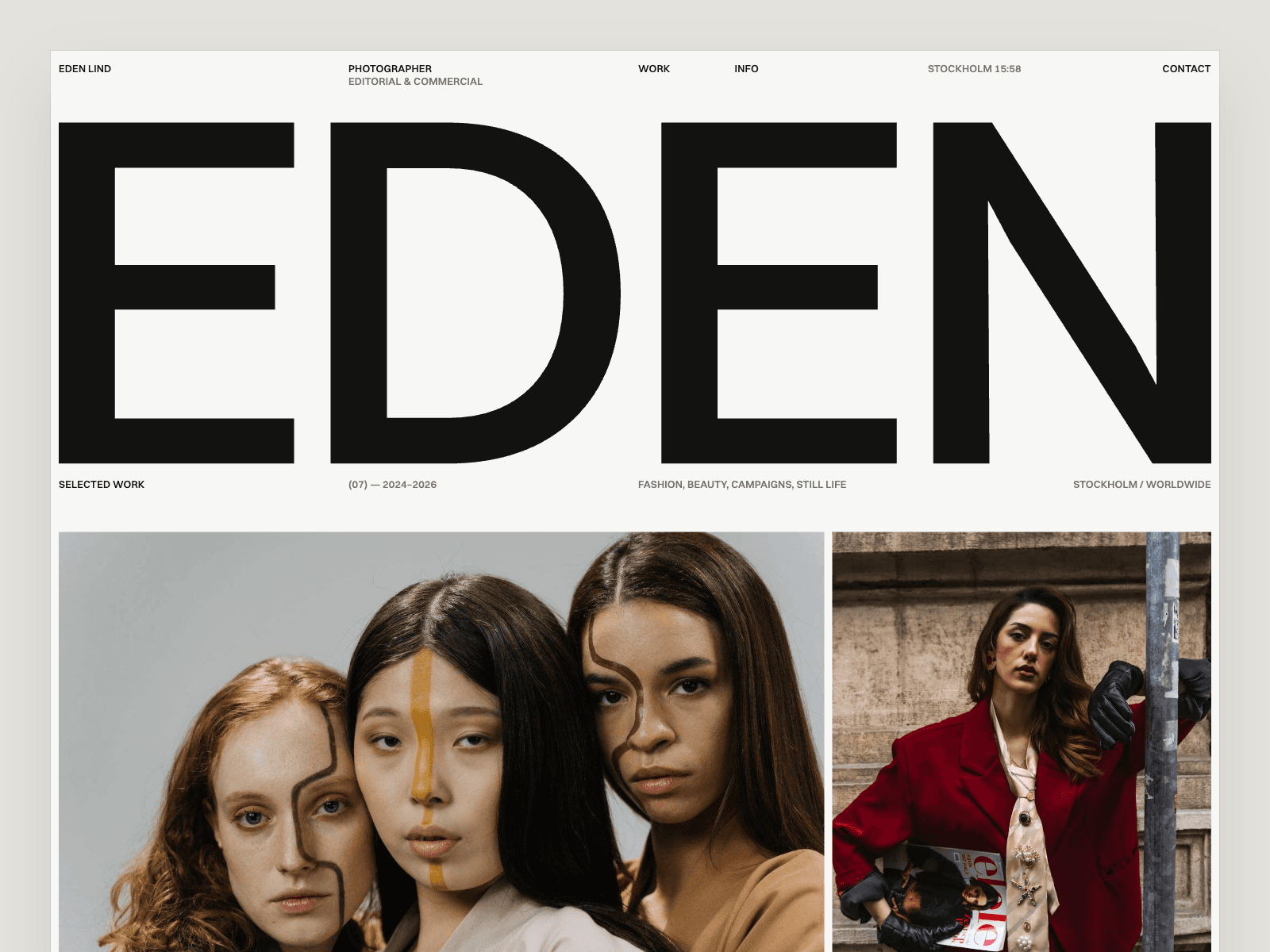
I built Eden Lind because templates for photographers kept failing in two ways. Most force a fixed number of images per project, and most are not unique or editorial enough for serious photography.
Eden Lind shows your work like an exhibition wall, not a feed. Each project page uses a gallery connected to the CMS, so you upload your photos and it arranges itself, whether a shoot has 4 images or 20. Categories become filter pages, and the projects you mark as featured appear on the home page.
The Work page opens as a grid of covers, and one click switches it to an Index list of projects, clients and years, where each cover follows the cursor. It suits fashion, beauty, campaign, still life and portrait photographers, and it also works for illustrators, art directors and stylists.
Watch out for: it is built for image-led work. If your projects are long written case studies, Miles or Fuel will suit them better.
6. Oblica: best for CGI, motion and visual studios
By Satto Studio · Free · Preview

Oblica gives images room. It is built for creatives across branding, CGI, motion and photography, with a minimal visual system that keeps the interface out of the way. Pages include an index, a works page, CMS project pages, an About page and a news section with CMS articles.
It handles both compact case studies and media-heavy projects without changing the design, and setup notes are included inside the template.
Watch out for: restraint is the whole idea. If your projects need long written case studies, Miles will suit them better.
7. Fuel: best for agencies and creatives who want a premium look
By Westhill Studio · Free · Preview

Fuel won Template of the Year at the 2025 Framer Awards, and it is free. It is a minimal agency and portfolio template that keeps the focus on the work, with a clean, polished layout that suits designers, freelancers, creative agencies and photographers.
It was last updated in August 2026, and the creator lists an email address for questions.
Watch out for: Fuel is built as much for agencies as for one person. If you work alone, rewrite the agency-style copy so it sounds like you, not a team.
8. JORGE: best for a minimal, content-first personal site
By Ludovic Losco · Free · Preview

JORGE is simple and lightweight: a minimal, content-first design with smooth transitions and subtle animations. It works as a personal site, a portfolio or a one-page landing page for designers, freelancers and visual creatives.
Watch out for: it was last updated in May 2026, earlier than most templates here, and its Marketplace page does not list pages or CMS setup. Check how projects are shown in the preview before you remix it.
9. Majd: best minimal all-rounder
By Mejed Alkoutaini · Free · Preview

Majd is calm and flexible enough for a designer, a developer or an artist. The structure is clean, scrolling is smooth (it runs on Lenis), and it was last updated in September 2026.
Watch out for: the Marketplace page does not list pages or CMS setup. Open the preview and check how a project page is built before you remix it.
10. Miles: best for minimal case studies and a fast setup
By Muhammed Irshad · Free · Preview

Miles is clean and minimal, with smooth interactions and a quick setup. Pages: Home, Works, a CMS Work Details page for case studies, Contact and 404. It was last updated in October 2026.
Watch out for: minimal templates rely on your work and words. With only two or three projects, it can feel empty, so add your strongest work first.
Which free Framer template fits your work?
Photographer: Eden Lind. For motion or CGI next to photos, Oblica.
Brand or graphic designer: Mike Bennet.
Designer or studio who wants a bold first impression: Kai Marlow, or Kirk if you want color and noise.
Agency or studio: Fuel.
Product or UX designer: Miles, for case studies with a fast setup.
Freelancer who sells services: LaunchFolio.
Developer or a bit of everything: Majd, or JORGE for a lighter personal site.
6 mistakes people make when picking a portfolio template
Choosing by the hero section. Clients spend most of their time on project pages. Open one project in every preview before you decide.
Skipping the phone check. Most clients open your link on a phone first. A template that falls apart on mobile costs you before they see a single project.
Picking a style that fights your work. A case study template with no room for images frustrates photographers, and an image wall frustrates product designers who need to explain their process.
Ignoring how projects are added. If each new project means building a page by hand, you will stop updating your portfolio. Look for a CMS project page or an Agent skill that does it for you.
Forgetting the domain costs money. The template is free, but your own domain needs a paid Framer plan. Budget for it from the start.
Rebuilding the template until it is unrecognizable. If you need to change everything, you picked the wrong template. Choose the one closest to what you want and change colors, fonts and content.
Is a free Framer template really free?
Yes, the template itself is free. Remixing it costs nothing, and you can publish it on a free framer.website address.
You pay Framer when you want more than that. Prices below are from framer.com/pricing as of October 2026:
Plan | Price | Custom domain | Pages | CMS collections |
|---|---|---|---|---|
Free | $0 | No | 1,000 | 10 |
Basic | $10 a month | Yes | 30 | 2 |
Pro | $30 a month | Yes | 150 | 10 |
Two things most guides leave out:
Yearly Basic and Pro plans include a free domain, so you do not need to buy one somewhere else.
Basic includes only 2 CMS collections. A portfolio with projects and categories fits. Add a blog or quote pages, as in LaunchFolio, and you may need Pro.
If you use Framer’s AI Agent with an Agent template, the Agent uses credits from your Framer plan.
For a full breakdown, read Framer pricing explained: which plan you need for a portfolio.
From remix to live portfolio in one afternoon
Open the preview on your phone. If it still feels right there, remix it.
Remix it for free. The template opens as your own copy in Framer.
Add your projects. Fill in the CMS form for each project, or in Mike Bennet and Kai Marlow, send your text and images to the Agent with add-project.
Swap colors and fonts. Change the color and text styles once and the whole site updates.
Publish and connect your domain. Hit Publish, then add your domain in the site settings.
The full walkthrough is in how to use a Framer template.
Want the template most creatives start with?
Most people who launch with Whoosh start with Mike Bennet. It looks finished from day one, every step has a video guide, and adding a new project takes minutes.
If you want a portfolio that is live today and easy to keep updated, open Mike Bennet and remix it for free.