Free Framer portfolio template
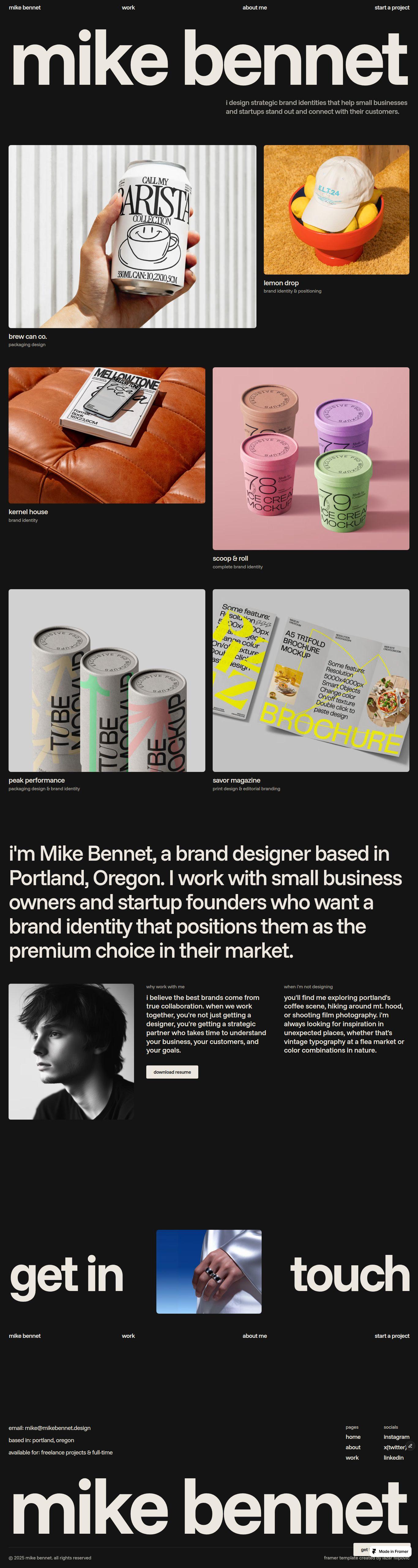
Mike Bennet is a free portfolio website template for Framer. It helps designers, studios and creatives launch a portfolio in a few hours.


Mike Bennet is a free portfolio website template for Framer. It helps designers, studios and creatives launch a portfolio in a few hours.
Most free templates give you the design and nothing else. This one has a work page and a full about page with your experience, plus a video guide for every step, a gallery that fits any project, and my email for when something goes wrong. Most people go live in an afternoon.
Flexible gallery for your case study pages that helps you show as many images and videos as you want, in three different layouts
You have four pieces of media for one project and eight for another. The template has one layout, so you adapt the work to it. You cut images out of the project that has too many, and the one with too few looks half empty.
That is why I built the Whoosh Media Grid.
Gallery layout
Choose a layout for each project, so every case study fits the work in it.
Grid: Two items side by side in every row.
Mosaic: One large item, then two small ones.
Stacked: Every item full width, one below the other.
Changing it takes seconds.
Gallery media
Add your images and videos in any order. Four in one project, thirty in the next, with no component to swap.
You never open the project page, so nothing breaks, and adding a photo a year from now takes a minute.
Note: the second video shows the same project in all three layouts.
Video customization guide for every step, from remixing the template to launching your site
Ten steps, in order, each with a short video
A list of what to get ready first, so you are not writing your bio at midnight
A prompt for Framer Agent in every step, ready to copy
A checklist you tick off, so you always know what is left
Read the guide first: Mike Bennet - Customization guide
Help when you get stuck
I made this template and I answer the emails myself. Something broke, you want to move a section, you want a second opinion on your text, just write to me. Same day.
Pages
Home
About
Projects
Project CMS
404
Perfect for
Brand designers
Creatives
Art directors
Graphic designers
Illustrators
How it works?
From template to live portfolio in three steps
You don't need to learn Framer first. Pick a template, add your work, and publish before the day is over.


Choose a template that fits your work
Preview each template as a live site and remix the one you like for free.
Customize it with your projects and text
Follow a simple step-by-step guide, drop in your own projects, and launch in just a few minutes.
Publish
Launch it on your own domain today
Connect your domain, hit publish, and send clients your new link the same day.